How to Scrape Instagram Profiles with Instagram Profile Scraper API
Scrape Instagram profiles using Python and Lobstr.io Instagram Profile Scraper API at scale without getting blocked.
I heard you, nerd bros 🫂
My last Instagram profile scraping tutorial was for no-code users who want a quick and easy solution.
👉 How to Scrape Instagram Profiles Without Coding
But what about the nerd brigade?
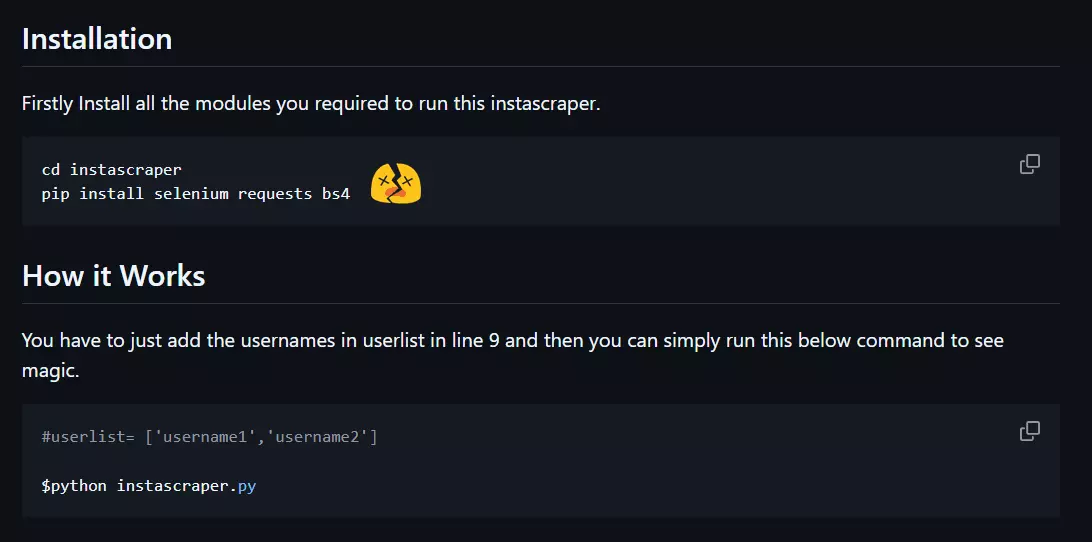
They usually end up wasting time on broken instascraper.py GitHub repos last updated millennia ago, or on an Instagram profile scraper API that quietly forces you into paying extra for proxies.
This tutorial fixes that.
I tried every common way of scraping Instagram profiles... HTML parsing, browser automation, Instagram's internal API, and multiple third-party APIs. Only one actually works at scale... a proper Instagram profile scraper API that handles sessions, proxies, and rate limits for you.
But why shouldn’t you just use the official API?
01 / 07Why not use the official Instagram API?#
Short answer… it doesn’t exist for this use case.
There’s no official Instagram API that lets you collect data from arbitrary public profiles. Instagram technically offers 2 APIs.
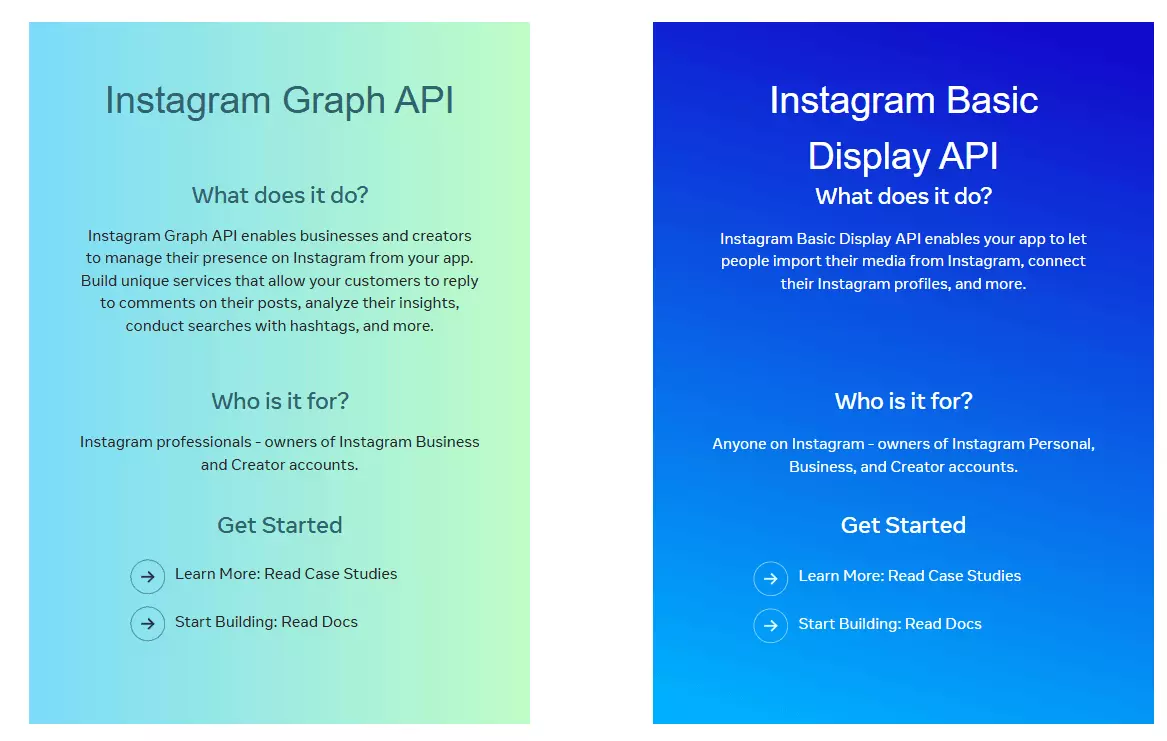
- Basic Display API
- Graph API
Basic Display API only works when a user logs into your app and grants access. You can read their profile and media. That’s it.
So no… you can’t use it to collect data from other public profiles.
Instagram Graph API is meant for Business and Creator accounts. Posting, comments, insights, account management.
It does have a relevant endpoint called Business Discovery.
It gives you really basic information like:
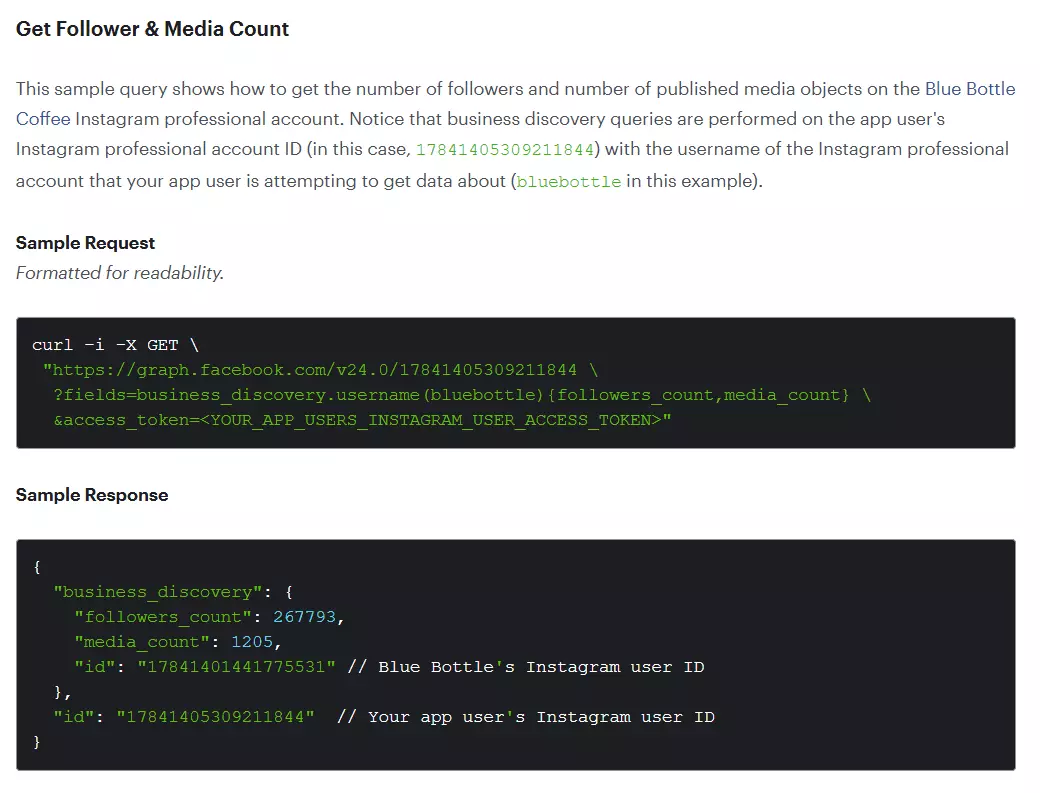
- Follower count
- Media count
- Likes and comments count per post
And it only works for Business or Creator accounts. Personal profiles are completely inaccessible. Plus you need your own verified Business account.
And of course, it’s heavily rate-limited.
So practically, there’s no official API to collect Instagram profiles data. That’s why you need to scrape it.
02 / 07Is it legal to scrape Instagram profiles?#
⚠️ Disclaimer The information in this section is for general informational purposes only. It reflects publicly available sources and my own interpretation of them. It does not constitute legal advice and should not be treated as such. Laws vary by jurisdiction and can change. If you need guidance on compliance, data use, contracts, or platform-specific risks, consult a qualified legal professional who can evaluate your situation in detail.
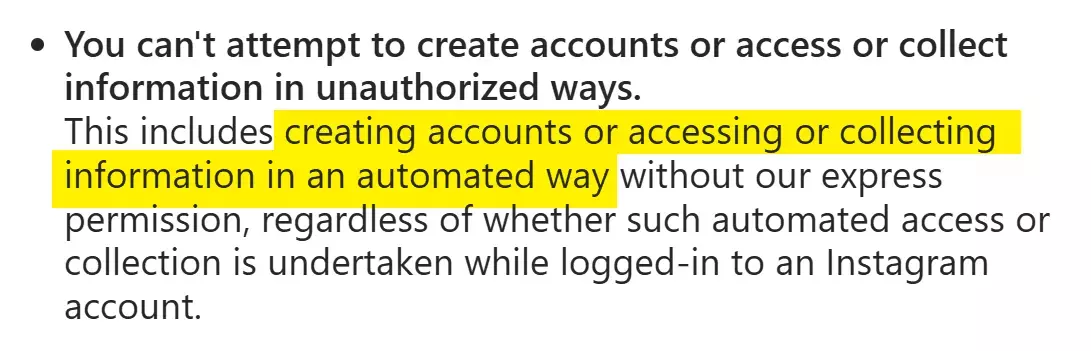
Instagram’s Terms of Service don’t allow automated access or data collection, including scraping.
So is it illegal?
Nope. Those are platform terms, not laws. Scraping publicly available data is generally considered legal.
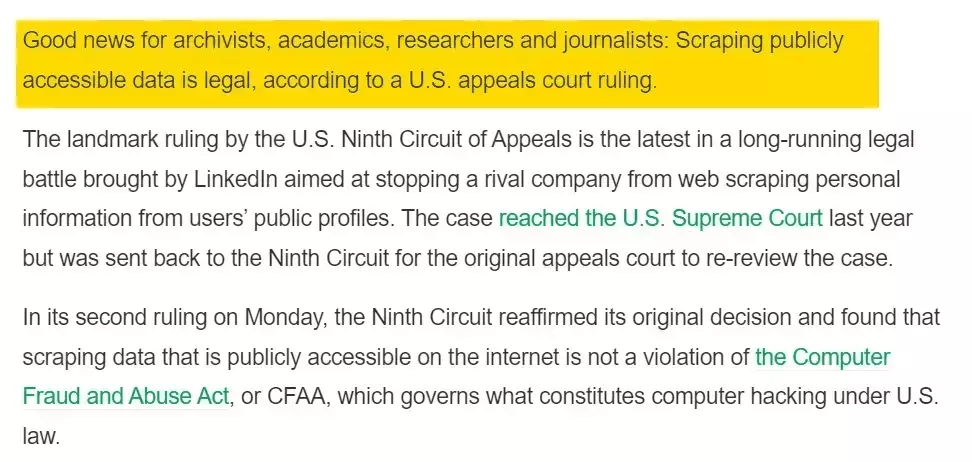
Instagram profiles are usually public. You don’t need to log in to view them, which makes scraping this data completely legal.
I’ve already explained this in detail in this article.
👉 Is it legal to scrape Instagram profiles?
That said, you should avoid collecting sensitive information and strictly follow data privacy and protection laws to ensure the data isn’t misused.
In this article, we’ll only scrape information that’s publicly accessible and doesn’t require login.
Now that legality is out of the way, the real question becomes… How do I actually scrape Instagram profiles?
03 / 072 ways of scraping Instagram profiles#
If someone just wants the data without nerd hassle, they’ll use a no-code tool.
I’ve already written a detailed tutorial on scraping Instagram profiles without coding, so I won’t repeat that here.
👉 How to Scrape Instagram Profiles Without Coding
This article is for my nerd bros, who want a programmatic approach.
So when it comes to scraping Instagram profiles with code, there are 2 common ways.
- Building your own scraper
- Using an Instagram profile scraper API
Building your own scraper#
This is the instinctive choice, and there are 3 most likely approaches you’d choose from:
- HTML parsing
- Browser automation
- Internal API
Guess what… I tried all 3 for this article.
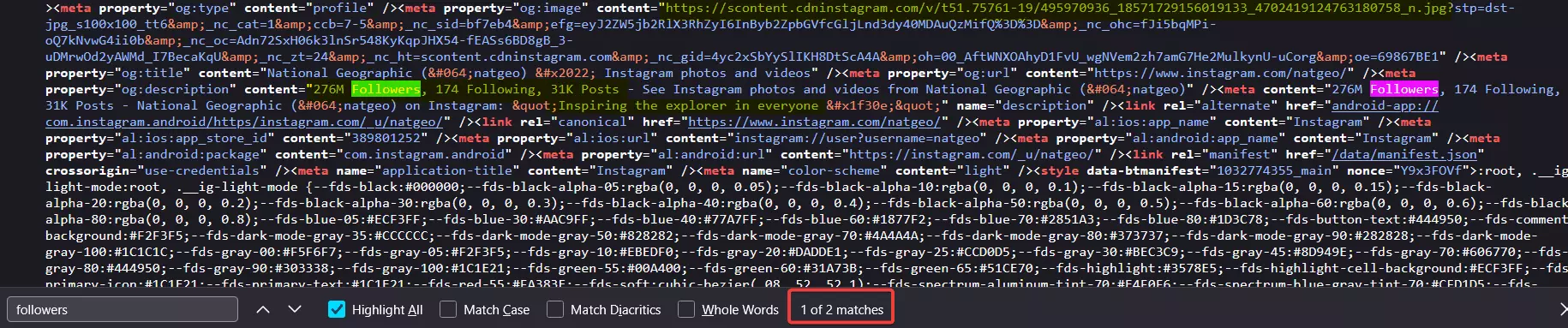
HTML parsing technically works… but only for surface-level data.
You can extract basic things like bio, followers count, following count, and total posts from meta tags. That’s about it. Everything else loads dynamically.
So if you’re a newbie, you’d start creating a browser automation script using Selenium or Playwright.
Bad idea.
Browser automation is slow, fragile, resource-heavy, and completely unscalable.Plus after a few profile requests, you’ll start hitting login redirect.
Fun fact, it’s actually the easiest to detect for Instagram.
That’s why smarter folks try digging into the network tab and looking for internal APIs.
And good news… It actually works.
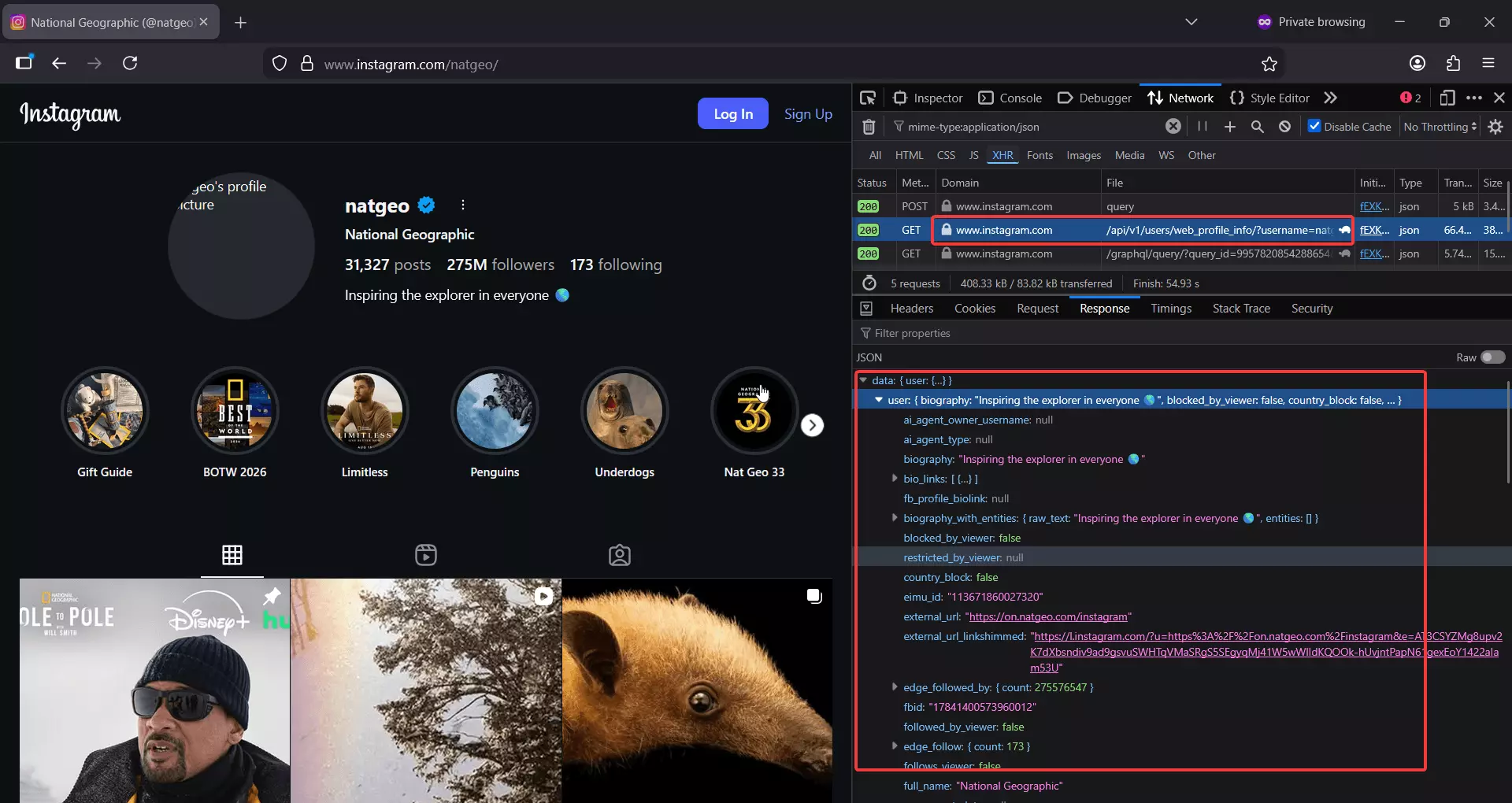
Instagram exposes a public endpoint that returns a lot of profile data:
https://www.instagram.com/api/v1/users/web_profile_info/?username={username}
This endpoint gives you almost all publicly available profile information, plus data from the latest 12 posts.
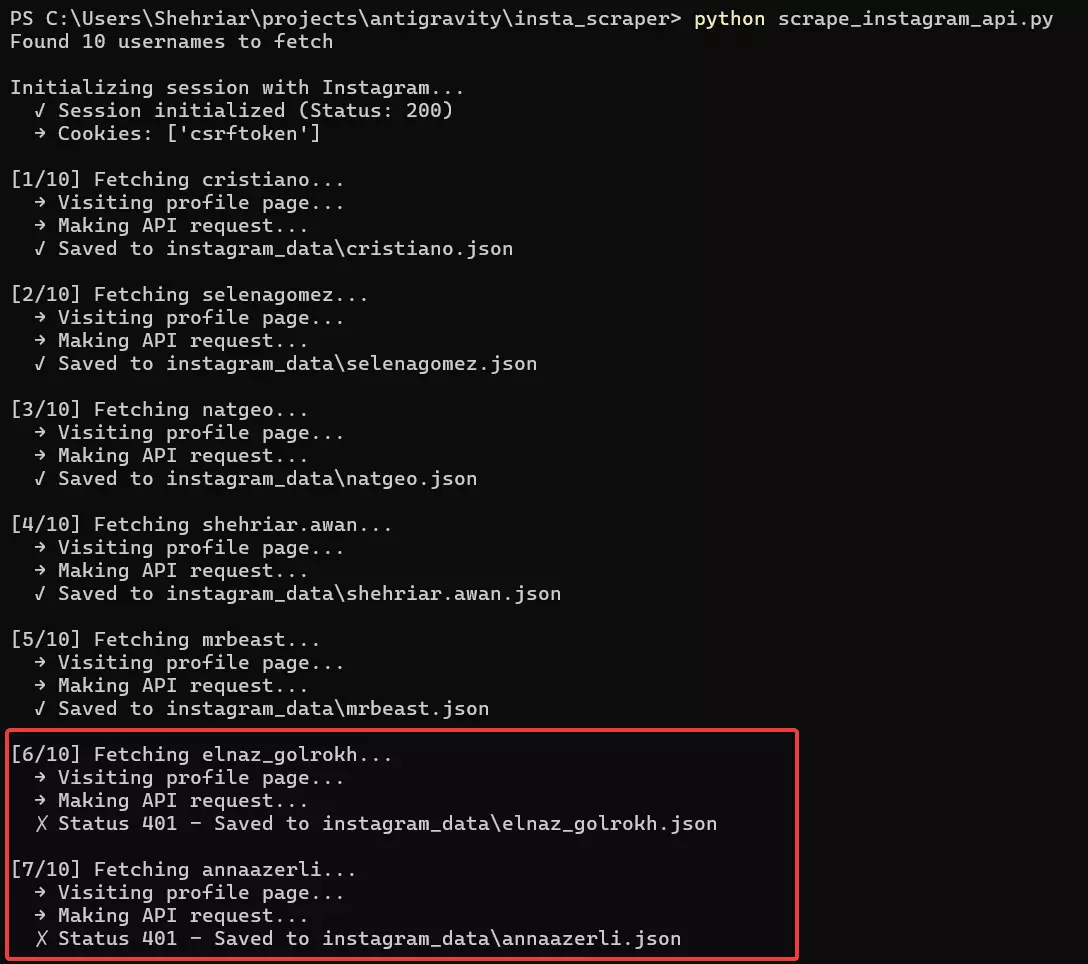
Sounds perfect… until rate limits kick in.
Yes, Instagram aggressively rate limits its internal APIs.
After a handful of requests, you’re forced to wait 10 to 15 minutes. To bypass that, you’ll need residential proxies, usually a large pool of them, which is pretty expensive tbh.
On top of that, headers expire randomly and have a short lifespan, so you’re constantly refreshing sessions just to keep things running.
By the time this setup is stable, you’ve already burned a lot of time and money. It’s good to explore as a side project, but not at all a scalable solution.
That's why anyone who wants a scalable solution practically goes for the 3rd option i.e. an Instagram profile scraper API.
Using an Instagram profile scraper API#
A good Instagram profile scraper API has already done all the effort for you and keeps doing it consistently to keep things running smoothly at scale.
These APIs handle everything for you:
- Session management
- Proxy rotation
- Rate limits
- Breakage when Instagram changes something
You don’t babysit the scraper. You just call an API and get data. That’s why anyone building a scalable solution eventually lands here.
But which Instagram profile scraper API is best?
Of course, I'll cover a full listicle comparing the best Instagram profile scraper APIs, but for now, we're gonna cover the best one in the business; Lobstr.io.
Best Instagram profile scraper API: Lobstr.io#
Lobstr.io is a France-based web scraping platform that offers 30+ ready-made scrapers for different platforms and use cases.
One of those is the Instagram Profile Scraper.
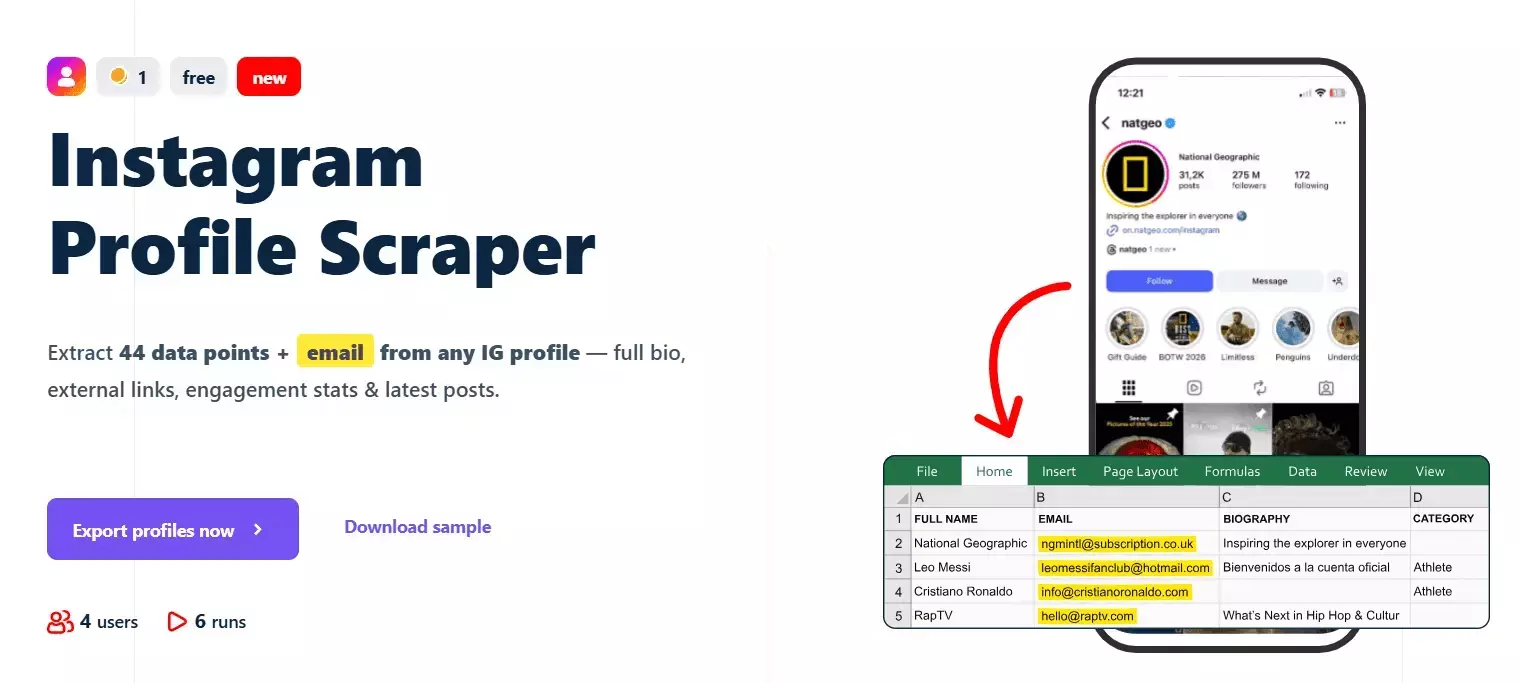
Scrape all public data from any Instagram profile
Features
- Developer-friendly API documentation
- 70+ meaningful data points per Instagram profile
- Profile metadata, contact information, external links, and recent posts
- No Instagram login required
- Built-in scheduling for recurring profile monitoring
- Dedicated scrapers for collecting all posts and Reels from profiles
- Export to CSV, JSON, Google Sheets, Amazon S3, SFTP, or email
- No hard limit on the number of profiles you can scrape
- 3000+ integrations available via Make.com
Data
| 🔗 all_external_urls[].url | 📝 all_external_urls[].title | 🏷️ all_external_urls[].link_type |
| 🌐 all_external_urls[].lynx_url | 📖 biography | 📞 business_contact_method |
| 📧 business_email | ☎️ business_phone_number | 🏢 category |
| 🔗 external_url.url | 📝 external_url.title | 🌐 external_url.lynx_url |
| 🏷️ external_url.link_type | 🆔 fbid | 👥 followers_count |
| 👤 follows_count | 👨💼 full_name | ⚙️ functions |
| 📺 has_channel | 🎬 has_clips | 📚 has_guides |
| ⭐ highlight_reel_count | 🎥 igtv_video_count | 💼 is_business_account |
| 🔒 is_private | 👔 is_professional_account | ✅ is_verified |
| 🆕 joined_recently | 🎬 latest_igtv_video.id | 🔗 latest_igtv_video.url |
| ❤️ latest_igtv_video.likes | 📝 latest_igtv_video.title | 👁️ latest_igtv_video.views |
| 💬 latest_igtv_video.caption | 💭 latest_igtv_video.comments | ⏱️ latest_igtv_video.duration |
| 📍 latest_igtv_video.location | 📅 latest_igtv_video.posted_at | 🔖 latest_igtv_video.shortcode |
| 🖼️ latest_igtv_video.thumbnail_url | 📸 latest_post.id | 🔗 latest_post.url |
| 📋 latest_post.type | ❤️ latest_post.likes | 👁️ latest_post.views |
| 💬 latest_post.caption | 💭 latest_post.comments | 🎥 latest_post.is_video |
| 📍 latest_post.location | 📅 latest_post.posted_at | 🔖 latest_post.shortcode |
| 🎵 latest_post.audio_info.audio_id | 🎶 latest_post.audio_info.song_name | 🎤 latest_post.audio_info.artist_name |
| 🔊 latest_post.audio_info.uses_original_audio | 📏 latest_post.dimensions.width | 📐 latest_post.dimensions.height |
| 🖼️ latest_post.display_url | 🔢 latest_post.media_count | 🏷️ latest_post.product_type |
| 🏷️ latest_post.tagged_users | 🔗 related_profiles[].username | 👨💼 related_profiles[].full_name |
| 🆔 native_id | 📊 posts_count | 🆔 profile_id |
| 👤 profile_picture_url | 🔗 profile_url | ⏰ scraping_time |
| 👤 username | | |
Pricing
Lobstr.io uses simple monthly pricing. Plans range from $20 to $500 per month, everything included. There are no extra proxy costs, or any hidden charges.
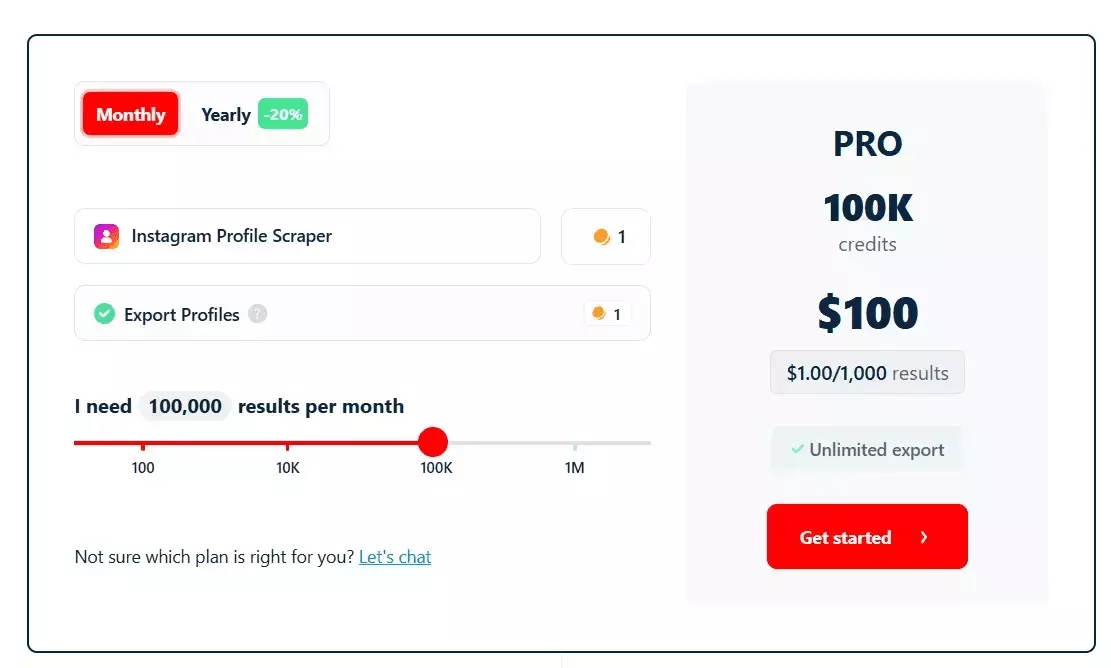
- 100 Instagram profiles per month are free
- Pricing starts at around $2 per 1,000 profiles
- Drops to $0.5 per 1,000 profiles at scale
04 / 07How to use the lobstr.io Instagram profile scraper API [Full Python code]#
Lobstr.io's Instagram profile scraper API is async. To use it properly, you send a short sequence of requests:
- Create and update a Squid
- Add tasks
- Run it, then check run progress
- Fetch results
I’ve already written plenty of guides on using Lobstr.io’s API, I’m adding the most recent ones below.
👉 Lobstr.io LinkedIn profile scraper API guide
👉 Lobstr.io Vinted products scraper API guide
Plus the API docs include step by step examples tailor-made for each scraper.
![How to scrape Instagram Profiles using Lobstr.io API [Full code]](https://d37gzvgyugjozl.cloudfront.net/image7_2be705539b.png)
So this time, I built a complete API client you can run from your terminal… and it handles the entire workflow for you.
I’m adding the full code below in a single file so you can clearly see how each endpoint is used.
P.S. I’m linking a GitHub repo after the code with a refactored and more organized version of the same script… multi-file, cleaner, and more robust.
Full code#
#!/usr/bin/env python3
"""
Instagram Profile Scraper using Lobstr.io API
"""
from __future__ import annotations
import os
import sys
import time
import argparse
import logging
import signal
import csv
import tempfile
from typing import Optional, Dict, List, Any
from pathlib import Path
from dataclasses import dataclass
from enum import Enum
import requests
from requests.adapters import HTTPAdapter
from urllib3.util.retry import Retry
from dotenv import load_dotenv
# ============================================================================
# Configuration
# ============================================================================
@dataclass
class Config:
"""Application configuration"""
BASE_URL: str = "https://api.lobstr.io/v1"
CRAWLER_ID: str = "5c55ffbf10fbbc7ee63ebb2bcaa332b7"
# Polling intervals (seconds)
UPLOAD_POLL_INTERVAL: int = 2
RUN_POLL_INTERVAL: int = 3
EXPORT_POLL_INTERVAL: int = 5
ERROR_RETRY_INTERVAL: int = 5
# Retry configuration
MAX_RETRIES: int = 3
BACKOFF_FACTOR: float = 0.5
RETRY_STATUS_CODES: tuple = (500, 502, 503, 504, 429)
# Request timeout (seconds)
REQUEST_TIMEOUT: int = 30
@classmethod
def from_env(cls) -> Config:
"""Create config from environment variables"""
return cls()
# ============================================================================
# Constants
# ============================================================================
SEPARATOR_LINE = "=" * 60
# ============================================================================
# Custom Exceptions
# ============================================================================
class ScraperException(Exception):
"""Base exception for scraper errors"""
pass
class APIException(ScraperException):
"""API request failed"""
pass
class UploadException(ScraperException):
"""File upload failed"""
pass
class RunException(ScraperException):
"""Run execution failed"""
pass
class ValidationException(ScraperException):
"""Input validation failed"""
pass
# ============================================================================
# Logging Setup
# ============================================================================
def setup_logging(level: int = logging.INFO) -> logging.Logger:
"""Configure application logging"""
logger = logging.getLogger("instagram_scraper")
logger.setLevel(level)
# Only add handler if none exists (prevent duplication)
if not logger.handlers:
# Console handler with custom format
handler = logging.StreamHandler(sys.stdout)
handler.setLevel(level)
# Custom formatter for clean output
formatter = logging.Formatter('%(message)s')
handler.setFormatter(formatter)
logger.addHandler(handler)
return logger
# ============================================================================
# API Client
# ============================================================================
class InstagramProfileScraperAPI:
"""Lobstr.io Instagram Profile Scraper API Client"""
def __init__(
self,
api_key: str,
config: Config,
logger: logging.Logger
):
self.api_key = api_key
self.config = config
self.logger = logger
self.session = self._create_session()
def _create_session(self) -> requests.Session:
"""Create a requests session with retry logic"""
session = requests.Session()
# Configure retry strategy
retry_strategy = Retry(
total=self.config.MAX_RETRIES,
backoff_factor=self.config.BACKOFF_FACTOR,
status_forcelist=self.config.RETRY_STATUS_CODES,
allowed_methods=["GET", "POST", "DELETE"]
)
adapter = HTTPAdapter(max_retries=retry_strategy)
session.mount("http://", adapter)
session.mount("https://", adapter)
# Set default headers
session.headers.update({
"Authorization": f"Token {self.api_key}",
"Content-Type": "application/json"
})
return session
def _make_request(
self,
method: str,
endpoint: str,
**kwargs
) -> requests.Response:
"""Make HTTP request with error handling"""
url = f"{self.config.BASE_URL}/{endpoint}"
try:
kwargs.setdefault('timeout', self.config.REQUEST_TIMEOUT)
response = self.session.request(method, url, **kwargs)
response.raise_for_status()
return response
except requests.exceptions.HTTPError as e:
error_msg = self._extract_error_message(e.response)
raise APIException(f"API request failed: {error_msg}") from e
except requests.exceptions.RequestException as e:
raise APIException(f"Network error: {str(e)}") from e
def _extract_error_message(self, response: requests.Response) -> str:
"""Extract error message from response"""
try:
error_data = response.json()
return str(error_data)
except (ValueError, requests.exceptions.JSONDecodeError):
return response.text or f"HTTP {response.status_code}"
def list_squids(self, crawler_id: Optional[str] = None) -> List[Dict[str, Any]]:
"""List all squids, optionally filtered by crawler"""
response = self._make_request("GET", "squids")
squids = response.json().get("data", [])
if crawler_id:
squids = [s for s in squids if s.get("crawler") == crawler_id]
return squids
def create_squid(self, crawler_id: str) -> Dict[str, Any]:
"""Create a new squid"""
response = self._make_request(
"POST",
"squids",
json={"crawler": crawler_id}
)
return response.json()
def update_squid(
self,
squid_hash: str,
name: Optional[str] = None,
concurrency: Optional[int] = None
) -> Dict[str, Any]:
"""Update squid settings"""
data = {}
if name is not None:
data["name"] = name
if concurrency is not None:
data["concurrency"] = concurrency
response = self._make_request(
"POST",
f"squids/{squid_hash}",
json=data
)
return response.json()
def empty_squid(self, squid_hash: str) -> Dict[str, Any]:
"""Empty all tasks from squid"""
response = self._make_request(
"POST",
f"squids/{squid_hash}/empty",
json={"type": "url"}
)
# Handle empty response (squid already empty)
try:
return response.json()
except requests.exceptions.JSONDecodeError:
# Empty response means squid was already empty or successfully emptied
return {"status": "success", "message": "Squid emptied"}
def delete_squid(self, squid_hash: str) -> bool:
"""Delete a squid"""
self._make_request("DELETE", f"squids/{squid_hash}")
return True
def get_tasks(self, squid_hash: str, page: int = 1) -> Dict[str, Any]:
"""Get tasks for a squid"""
response = self._make_request(
"GET",
f"tasks?squid={squid_hash}&type=url&page={page}"
)
return response.json()
def has_tasks(self, squid_hash: str) -> bool:
"""Check if squid has any tasks"""
try:
result = self.get_tasks(squid_hash, page=1)
data = result.get('data', [])
return len(data) > 0
except APIException as e:
# If we can't check tasks (e.g., network error), log and assume no tasks
self.logger.debug(f"Failed to check tasks: {e}")
return False
def add_tasks(self, squid_hash: str, urls: List[str]) -> Dict[str, Any]:
"""Add tasks to squid"""
tasks = [{"url": url.strip()} for url in urls if url.strip()]
response = self._make_request(
"POST",
"tasks",
json={"tasks": tasks, "squid": squid_hash}
)
return response.json()
def upload_tasks(self, squid_hash: str, file_path: Path) -> Dict[str, Any]:
"""
Upload tasks from file.
Handles .txt files by converting them to CSV with a 'url' header.
"""
if not file_path.exists():
raise ValidationException(f"File not found: {file_path}")
# Use clean headers without Content-Type (let requests set multipart/form-data)
headers = {"Authorization": f"Token {self.api_key}"}
data = {'squid': squid_hash}
file_ext = file_path.suffix.lower()
try:
if file_ext == '.txt':
# Convert .txt to temporary .csv with header
with tempfile.NamedTemporaryFile(mode='w+', delete=False, suffix='.csv', newline='') as temp_csv:
temp_csv_path = Path(temp_csv.name)
try:
writer = csv.writer(temp_csv)
writer.writerow(['url']) # Add header
count = 0
with file_path.open('r', encoding='utf-8') as src:
for line in src:
url = line.strip()
if url:
writer.writerow([url])
count += 1
if count == 0:
raise ValidationException("Input file is empty")
# Flush and seek to start for reading
temp_csv.flush()
temp_csv.seek(0)
# Re-open for reading in binary mode for upload
with open(temp_csv_path, 'rb') as f_in:
files = {'file': (file_path.stem + '.csv', f_in, 'text/csv')}
response = requests.post(
f"{self.config.BASE_URL}/tasks/upload",
headers=headers,
files=files,
data=data,
timeout=self.config.REQUEST_TIMEOUT
)
finally:
# cleanup temp file
try:
temp_csv_path.unlink()
except OSError:
pass
else:
# Direct upload for other supported formats
with file_path.open('rb') as f:
files = {'file': f}
response = requests.post(
f"{self.config.BASE_URL}/tasks/upload",
headers=headers,
files=files,
data=data,
timeout=self.config.REQUEST_TIMEOUT
)
response.raise_for_status()
return response.json()
except requests.exceptions.HTTPError as e:
error_msg = self._extract_error_message(e.response)
raise UploadException(f"Upload failed: {error_msg}") from e
except Exception as e:
if isinstance(e, ScraperException):
raise
raise UploadException(f"Upload processing failed: {str(e)}") from e
def get_upload_status(self, upload_task_id: str) -> Dict[str, Any]:
"""Check upload task status"""
response = self._make_request("GET", f"tasks/upload/{upload_task_id}")
return response.json()
def start_run(self, squid_hash: str) -> Dict[str, Any]:
"""Start a run"""
response = self._make_request(
"POST",
"runs",
json={"squid": squid_hash}
)
return response.json()
def get_run_stats(self, run_hash: str) -> Dict[str, Any]:
"""Get run statistics"""
response = self._make_request("GET", f"runs/{run_hash}/stats")
return response.json()
def get_console_output(self, squid_hash: str, run_hash: str) -> str:
"""Get console output for a run"""
response = self._make_request(
"GET",
f"console.json?squid={squid_hash}&run={run_hash}"
)
return response.text
def get_squid_errors(
self,
squid_hash: str,
run_hash: Optional[str] = None
) -> List[Dict[str, Any]]:
"""Get errors for a squid, optionally filtered by run"""
response = self._make_request("GET", f"squids/{squid_hash}/errors")
errors = response.json().get("data", [])
if run_hash:
errors = [e for e in errors if e.get("run") == run_hash]
return errors
def list_runs(self, squid_hash: str, page: int = 1) -> Dict[str, Any]:
"""List runs for a squid"""
response = self._make_request("GET", f"runs?squid={squid_hash}&page={page}")
return response.json()
def download_run(self, run_hash: str) -> str:
"""Get download link for run results"""
response = self._make_request("GET", f"runs/{run_hash}/download")
return response.json().get("s3", "")
def abort_run(self, run_hash: str) -> Dict[str, Any]:
"""Abort a running run"""
response = self._make_request("POST", f"runs/{run_hash}/abort")
return response.json()
def close(self) -> None:
"""Close the session and cleanup resources"""
if self.session:
self.session.close()
def __enter__(self) -> InstagramProfileScraperAPI:
"""Context manager entry"""
return self
def __exit__(self, _exc_type: Any, _exc_val: Any, _exc_tb: Any) -> None:
"""Context manager exit"""
self.close()
# ============================================================================
# Upload Status Tracker
# ============================================================================
class UploadStatus(Enum):
"""Upload task states"""
PENDING = "PENDING"
SUCCESS = "SUCCESS"
FAILURE = "FAILURE"
class UploadTracker:
"""Tracks file upload progress"""
def __init__(self, api: InstagramProfileScraperAPI, logger: logging.Logger):
self.api = api
self.logger = logger
def wait_for_completion(self, upload_task_id: str) -> Dict[str, Any]:
"""Poll upload status until completion"""
self.logger.info("Checking upload status...")
while True:
try:
status = self.api.get_upload_status(upload_task_id)
state = status.get('state', 'UNKNOWN')
if state == UploadStatus.SUCCESS.value:
meta = status.get('meta', {})
self.logger.info("Upload completed successfully!")
self.logger.info(f" Valid: {meta.get('valid', 0)}")
self.logger.info(f" Inserted: {meta.get('inserted', 0)}")
self.logger.info(f" Duplicates: {meta.get('duplicates', 0)}")
self.logger.info(f" Invalid: {meta.get('invalid', 0)}")
return meta
elif state == UploadStatus.FAILURE.value:
raise UploadException("Upload failed")
else:
self.logger.info(f" Status: {state}...")
time.sleep(self.api.config.UPLOAD_POLL_INTERVAL)
except ScraperException:
raise
except Exception as e:
self.logger.warning(f"Error checking upload status: {e}")
time.sleep(self.api.config.ERROR_RETRY_INTERVAL)
# ============================================================================
# Run Monitor
# ============================================================================
class RunMonitor:
"""Monitors and displays run progress"""
def __init__(
self,
api: InstagramProfileScraperAPI,
logger: logging.Logger
):
self.api = api
self.logger = logger
self.last_console_output = ""
self.seen_error_ids = set()
def _fetch_and_display_console(self, squid_hash: str, run_hash: str) -> None:
"""Fetch and display new console output"""
try:
console_output = self.api.get_console_output(squid_hash, run_hash)
if console_output != self.last_console_output:
if self.last_console_output:
# Only print new lines
new_lines = console_output[len(self.last_console_output):]
print(new_lines, end='')
else:
# First time, print everything
print(console_output)
self.last_console_output = console_output
except Exception as e:
self.logger.debug(f"Failed to fetch console output: {e}")
def _check_for_errors(self, squid_hash: str, run_hash: str) -> bool:
"""Check for new errors, returns True if errors found"""
try:
errors = self.api.get_squid_errors(squid_hash, run_hash=run_hash)
new_errors = [e for e in errors if e.get('id') not in self.seen_error_ids]
if new_errors:
for error in new_errors:
self.seen_error_ids.add(error.get('id'))
self._display_error(error)
return True
except Exception as e:
self.logger.debug(f"Failed to check errors: {e}")
return False
def _display_error(self, error: Dict[str, Any]) -> None:
"""Display error in formatted way"""
self.logger.error("\n" + SEPARATOR_LINE)
self.logger.error("ERROR DETECTED - STOPPING RUN")
self.logger.error(SEPARATOR_LINE)
self.logger.error(f"Title: {error.get('title', 'N/A')}")
self.logger.error(f"Description: {error.get('description', 'N/A')}")
self.logger.error(f"Time: {error.get('created_at', 'N/A')}")
self.logger.error(SEPARATOR_LINE + "\n")
def monitor_until_complete(
self,
squid_hash: str,
run_hash: str
) -> Dict[str, Any]:
"""Monitor run until completion or error"""
self.logger.info("(Press Ctrl+C to abort)\n")
while True:
try:
# Check for errors first
if self._check_for_errors(squid_hash, run_hash):
raise RunException("Run failed with errors")
# Get run stats
stats = self.api.get_run_stats(run_hash)
is_done = stats.get('is_done', False)
# Display console output
self._fetch_and_display_console(squid_hash, run_hash)
if is_done:
# Fetch final console output
self._fetch_and_display_console(squid_hash, run_hash)
self.logger.info("\n" + SEPARATOR_LINE)
self.logger.info("Run completed!")
self.logger.info(f" Duration: {stats.get('duration', 'N/A')}")
self.logger.info(f" Total results: {stats.get('total_results', 'N/A')}")
self.logger.info(SEPARATOR_LINE)
return stats
time.sleep(self.api.config.RUN_POLL_INTERVAL)
except (ScraperException, KeyboardInterrupt):
raise
except Exception as e:
self.logger.error(f"Error polling run: {e}")
time.sleep(self.api.config.ERROR_RETRY_INTERVAL)
# ============================================================================
# Export Manager
# ============================================================================
class ExportManager:
"""Manages result export and download"""
def __init__(self, api: InstagramProfileScraperAPI, logger: logging.Logger):
self.api = api
self.logger = logger
def wait_for_export(self, squid_hash: str, run_hash: str) -> bool:
"""Wait for export to be ready"""
self.logger.info("Checking export status...")
while True:
try:
runs = self.api.list_runs(squid_hash, page=1)
run_data = next(
(r for r in runs.get('data', []) if r.get('id') == run_hash),
None
)
if not run_data:
raise RunException("Run not found")
if run_data.get('export_done', False):
self.logger.info("Export ready!")
return True
self.logger.info(" Waiting for export to complete...")
time.sleep(self.api.config.EXPORT_POLL_INTERVAL)
except ScraperException:
raise
except Exception as e:
self.logger.error(f"Error checking export status: {e}")
time.sleep(self.api.config.ERROR_RETRY_INTERVAL)
def get_download_url(self, run_hash: str) -> str:
"""Get S3 download URL"""
self.logger.info("Getting download link...")
url = self.api.download_run(run_hash)
if not url:
raise RunException("No download link available")
return url
def download_file(self, url: str, run_hash: str, output_dir: Path = None) -> Path:
"""Download CSV file from S3 using streaming"""
if output_dir is None:
output_dir = Path.cwd()
filename = output_dir / f"instagram_profiles_{run_hash}.csv"
self.logger.info("Downloading...")
# Use requests.get directly - S3 pre-signed URLs are sensitive to extra headers
# Stream=True to avoid loading entire file into memory
with requests.get(url, stream=True, timeout=300) as response:
response.raise_for_status()
with open(filename, 'wb') as f:
for chunk in response.iter_content(chunk_size=8192):
f.write(chunk)
self.logger.info(f"Downloaded to: {filename}")
return filename
# ============================================================================
# User Interface Layer
# ============================================================================
class UserInterface:
"""Handles user interaction and display"""
def __init__(self, logger: logging.Logger):
self.logger = logger
def print_header(self, title: str) -> None:
"""Print section header"""
self.logger.info("\n" + SEPARATOR_LINE)
self.logger.info(title)
self.logger.info(SEPARATOR_LINE)
def confirm(self, message: str) -> bool:
"""Get yes/no confirmation from user"""
response = input(f"{message} (y/n): ").strip().lower()
return response == 'y'
def get_input(self, prompt: str, required: bool = False) -> str:
"""Get text input from user"""
while True:
value = input(f"{prompt}: ").strip()
if value or not required:
return value
self.logger.error("This field cannot be empty.")
def choose_squid(
self,
squids: List[Dict[str, Any]]
) -> Optional[Dict[str, Any]]:
"""Interactive squid selection"""
self.print_header("SQUID SELECTION")
if not squids:
self.logger.info("\nNo Instagram Profile Scraper squids found.")
if self.confirm("Create a new squid?"):
return None
else:
raise ValidationException("Cannot proceed without a squid")
self.logger.info(f"\nFound {len(squids)} squid(s):\n")
for idx, squid in enumerate(squids, 1):
self.logger.info(f" [{idx}] {squid.get('name', 'Unnamed')}")
self.logger.info(f" ID: {squid.get('id', 'N/A')}")
self.logger.info(f" Concurrency: {squid.get('concurrency', 'N/A')}")
self.logger.info(f" Last Run: {squid.get('last_run_at', 'Never')}")
self.logger.info(f" Last Run Done: {squid.get('last_run_is_done', 'N/A')}")
self.logger.info("")
self.logger.info(f" [0] Create new squid\n")
while True:
try:
choice = input(f"Choose a squid [0-{len(squids)}]: ").strip()
choice_num = int(choice)
if choice_num == 0:
return None
elif 1 <= choice_num <= len(squids):
return squids[choice_num - 1]
else:
self.logger.error(
f"Invalid choice. Enter a number between 0 and {len(squids)}"
)
except ValueError:
self.logger.error("Invalid input. Please enter a number.")
def get_squid_name(self) -> str:
"""Get squid name from user"""
return self.get_input("\nEnter squid name", required=True)
# ============================================================================
# Main Application Controller
# ============================================================================
class InstagramScraperApp:
"""Main application controller"""
def __init__(self, config: Config, api_key: str):
self.config = config
self.logger = setup_logging()
self.api = InstagramProfileScraperAPI(api_key, config, self.logger)
self.ui = UserInterface(self.logger)
self.current_run_hash: Optional[str] = None
# Setup signal handler
signal.signal(signal.SIGINT, self._signal_handler)
def _signal_handler(self, _: int, __: Any) -> None:
"""Handle keyboard interrupt"""
self.logger.warning("\n\nInterrupt detected!")
if self.current_run_hash:
if self.ui.confirm("Do you want to abort the current run?"):
try:
self.api.abort_run(self.current_run_hash)
self.logger.info(f"Run {self.current_run_hash} aborted")
except Exception as e:
self.logger.error(f"Error aborting run: {e}")
self.logger.info("Exiting...")
sys.exit(0)
def select_or_create_squid(self) -> tuple[str, bool]:
"""Select existing squid or create new one
Returns:
tuple[str, bool]: (squid_hash, is_new)
"""
squids = self.api.list_squids(crawler_id=self.config.CRAWLER_ID)
selected = self.ui.choose_squid(squids)
if selected:
return selected.get('id'), False
else:
return self._create_new_squid(), True
def _create_new_squid(self) -> str:
"""Create and configure new squid"""
self.ui.print_header("CREATE NEW SQUID")
self.logger.info("\nCreating squid...")
squid = self.api.create_squid(self.config.CRAWLER_ID)
squid_hash = squid.get('id')
self.logger.info(f"Squid created: {squid_hash}")
# Get name
name = self.ui.get_squid_name()
self.api.update_squid(squid_hash, name=name)
self.logger.info(f"Squid named: {name}")
return squid_hash
def configure_squid(
self,
squid_hash: str,
concurrency: int,
empty: bool = False
) -> None:
"""Configure squid settings"""
# Only prompt to empty if squid has tasks
if empty:
if self.api.has_tasks(squid_hash):
if self.ui.confirm("\nEmpty squid (delete all existing tasks)?"):
self.logger.info("Emptying squid...")
self.api.empty_squid(squid_hash)
self.logger.info("Squid emptied")
# If no tasks, silently skip
# Update concurrency
self.api.update_squid(squid_hash, concurrency=concurrency)
self.logger.info(f"Concurrency set to {concurrency}")
def add_tasks(
self,
squid_hash: str,
url: Optional[str] = None,
file_path: Optional[Path] = None
) -> None:
"""Add tasks to squid"""
self.ui.print_header("ADDING TASKS")
if file_path:
self.logger.info(f"\nUploading tasks from file: {file_path}")
upload_result = self.api.upload_tasks(squid_hash, file_path)
upload_task_id = upload_result.get('id')
self.logger.info(f"Upload initiated: {upload_task_id}\n")
# Wait for upload to complete
tracker = UploadTracker(self.api, self.logger)
tracker.wait_for_completion(upload_task_id)
elif url:
self.logger.info(f"\nAdding single URL: {url}")
self.api.add_tasks(squid_hash, [url])
self.logger.info("Task added successfully")
else:
raise ValidationException("No URL or file provided")
def run_scraper(self, squid_hash: str) -> str:
"""Execute scraping run"""
self.ui.print_header("STARTING RUN")
run = self.api.start_run(squid_hash)
run_hash = run.get('id')
self.current_run_hash = run_hash
try:
monitor = RunMonitor(self.api, self.logger)
monitor.monitor_until_complete(squid_hash, run_hash)
return run_hash
finally:
self.current_run_hash = None
def download_results(self, squid_hash: str, run_hash: str) -> None:
"""Download scraping results"""
self.ui.print_header("DOWNLOADING RESULTS")
manager = ExportManager(self.api, self.logger)
# Wait for export
manager.wait_for_export(squid_hash, run_hash)
# Get download URL
download_url = manager.get_download_url(run_hash)
self.logger.info(f"\nDownload link:\n {download_url}\n")
# Download file
try:
output_file = manager.download_file(download_url, run_hash)
self.logger.info(f"File saved: {output_file}")
except Exception as e:
self.logger.error(f"Error downloading file: {e}")
self.logger.info(f"Manual download: {download_url}")
def run(
self,
url: Optional[str] = None,
file_path: Optional[Path] = None,
concurrency: int = 1
) -> None:
"""Main application flow"""
self.ui.print_header("INSTAGRAM PROFILE SCRAPER")
# Select or create squid
squid_hash, is_new = self.select_or_create_squid()
self.logger.info(f"\nUsing squid: {squid_hash}")
# Configure squid (only prompt to empty if it's an existing squid)
self.configure_squid(squid_hash, concurrency, empty=not is_new)
# Add tasks
self.add_tasks(squid_hash, url=url, file_path=file_path)
# Run scraper
run_hash = self.run_scraper(squid_hash)
# Download results
self.download_results(squid_hash, run_hash)
self.ui.print_header("COMPLETED")
# ============================================================================
# CLI Entry Point
# ============================================================================
def validate_args(args: argparse.Namespace) -> None:
"""Validate command line arguments"""
if not args.url and not args.file:
raise ValidationException("Either --url or --file must be provided")
if args.url and args.file:
raise ValidationException("Cannot use both --url and --file")
if args.file:
file_path = Path(args.file)
if not file_path.exists():
raise ValidationException(f"File not found: {file_path}")
if file_path.suffix.lower() not in ['.txt', '.csv', '.tsv']:
raise ValidationException(
f"Unsupported file type: {file_path.suffix}. "
"Use .txt, .csv, or .tsv"
)
if args.slots < 1:
raise ValidationException("Concurrency slots must be at least 1")
def main() -> None:
"""Main CLI function"""
parser = argparse.ArgumentParser(
description="Instagram Profile Scraper using Lobstr.io API",
formatter_class=argparse.RawDescriptionHelpFormatter,
epilog="""
Examples:
%(prog)s --url https://instagram.com/user123
%(prog)s --file urls.txt --slots 5
"""
)
parser.add_argument(
"--url",
type=str,
help="Single Instagram URL to scrape"
)
parser.add_argument(
"--file",
type=str,
help="File containing URLs (one per line, .txt/.csv/.tsv)"
)
parser.add_argument(
"--slots", "-s",
type=int,
default=1,
help="Concurrency slots (default: 1)"
)
parser.add_argument(
"--verbose", "-v",
action="store_true",
help="Enable verbose logging"
)
args = parser.parse_args()
try:
# Validate arguments
validate_args(args)
# Load configuration
config = Config.from_env()
# Get API key
load_dotenv()
api_key = os.getenv("API_KEY")
if not api_key:
raise ValidationException("API_KEY not found in .env file")
# Create and run application
app = InstagramScraperApp(config, api_key)
# Set log level
if args.verbose:
app.logger.setLevel(logging.DEBUG)
# Run with provided arguments
file_path = Path(args.file) if args.file else None
app.run(url=args.url, file_path=file_path, concurrency=args.slots)
except ValidationException as e:
print(f"Validation error: {e}", file=sys.stderr)
sys.exit(1)
except ScraperException as e:
print(f"Scraper error: {e}", file=sys.stderr)
sys.exit(1)
except KeyboardInterrupt:
print("\nOperation cancelled by user", file=sys.stderr)
sys.exit(130)
except Exception as e:
print(f"Unexpected error: {e}", file=sys.stderr)
if 'args' in locals() and hasattr(args, 'verbose') and args.verbose:
import traceback
traceback.print_exc()
sys.exit(1)
if __name__ == "__main__":
main()
How to set up and use this script#
First, get your API key from the Lobstr.io dashboard.
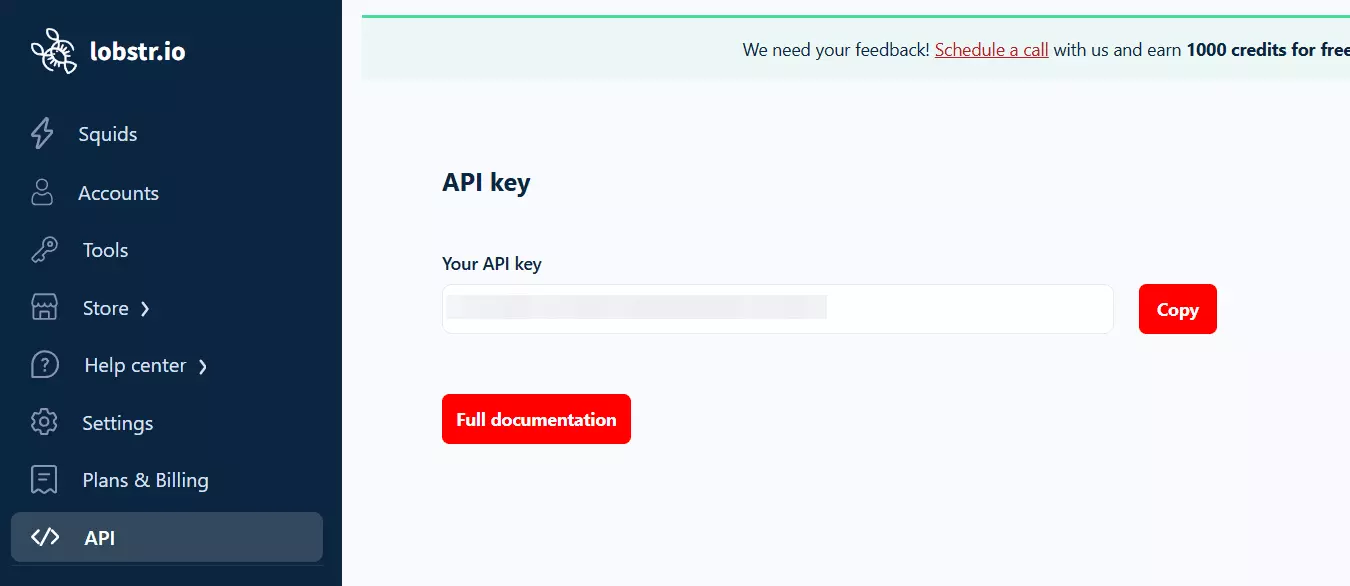
Install dependencies:
pip install -r requirements.txt
Create your environment file (.env) and add your API key in it.
API_KEY=your_lobstr_api_key_here
Now you can run the scraper for a single profile or a batch of profiles.
Scrape a single profile
If you want to scrape one profile, pass the Instagram profile URL directly:
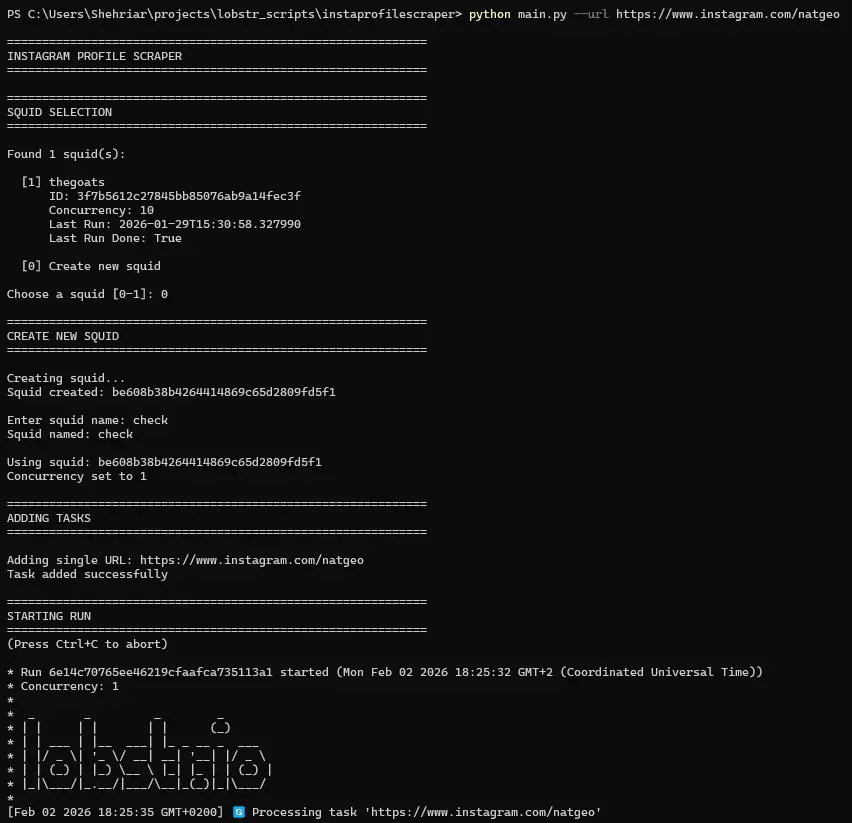
python instagramprofilescaper.py --url https://instagram.com/cristiano
This will first ask you whether you want to create a new instance (Squid) or use an existing one, and then the run starts.
Scrape thousands of profiles from a list
If you have a list of thousands of profiles, obviously passing them one by one doesn’t make sense.
Lobstr.io has an upload file endpoint to handle large lists of inputs, I’ve used that in this script too. Just put the URLs in a file and pass that file to the script.
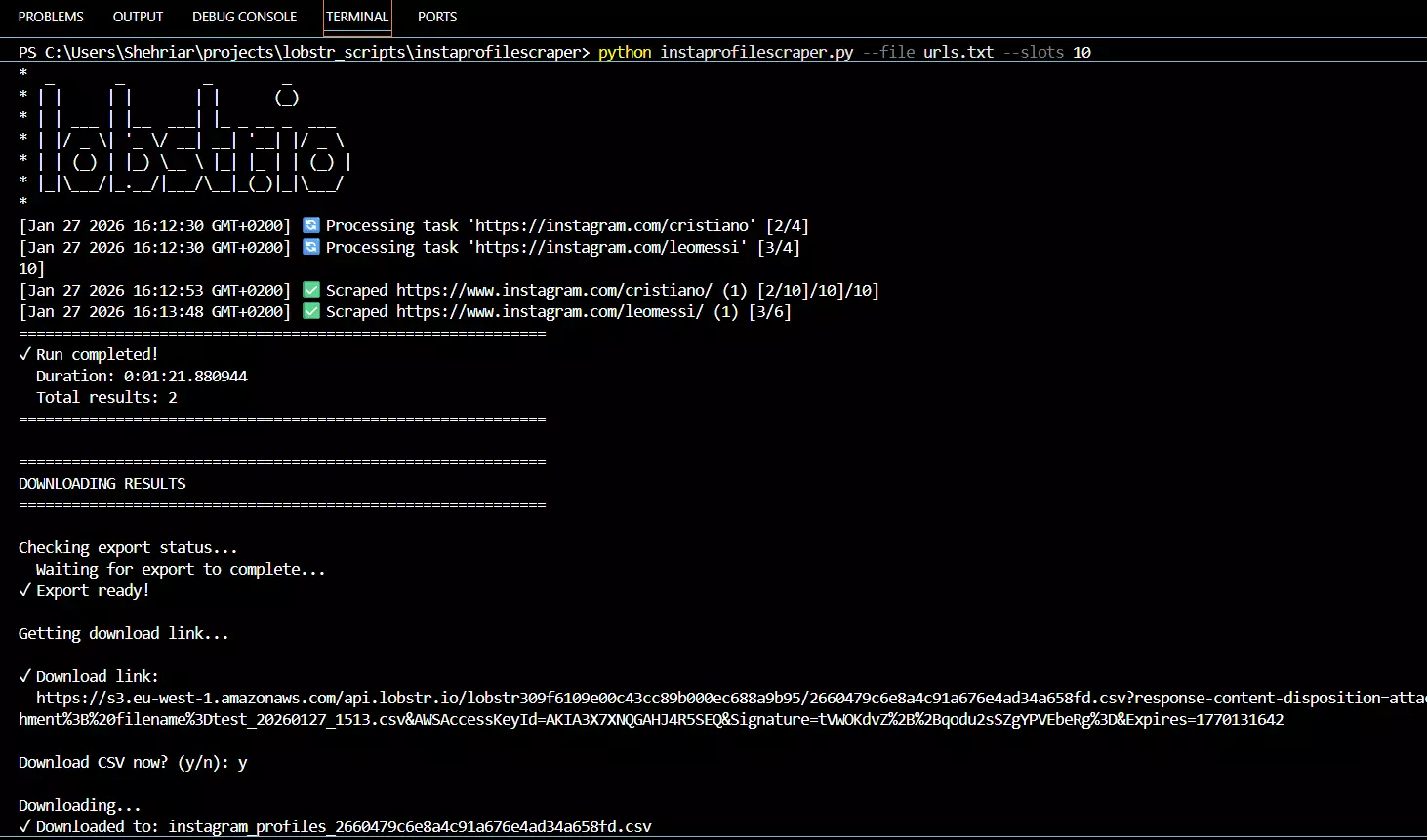
python instagramprofilescaper.py --file urls.txt
Supported formats:
TXT, one URL per lineCSV, must include aurlcolumn
The --slots argument controls how many scraping tasks run concurrently. Increasing this allows you to process profiles faster. By default it’s set to 1.
python instagramprofilescraper.py --file urls.txt --slots 50
There’s a limit on the number of slots you can use. Free users can’t use more than 1, Starter plan offers max 2 slots, Pro offers 10, and Team plan offers 50.
If you want to export results as JSON instead of CSV, you can use this endpoint instead:
curl -X GET "https://api.lobstr.io/v1/results?run=<run_id>&page=1&page_size=50" \
  -H "Authorization: Token YOUR_API_KEY"
Speaking of export flexibility, I just realized, I never actually covered Delivery endpoints in any of my API related articles.
05 / 07How to automate exports to Google Sheets or email#
I didn’t include it in the Python script because I’m usually fine with the CSV output.
But what if you want the results pushed to Google Sheets automatically, or receive a CSV file by email every time a run completes?
That’s where Delivery endpoints come in.
Export results to Google Sheets#
If you’ve used the no-code app, you’ve already seen this feature. The same thing is available via API.
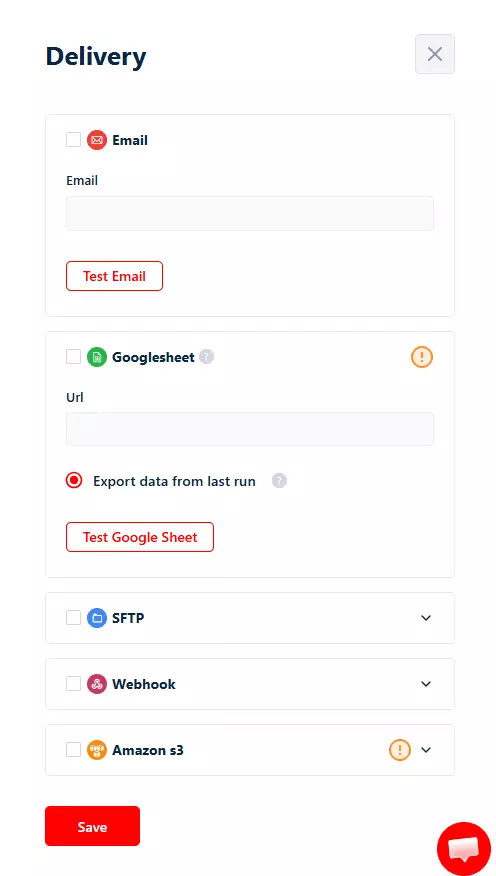
You can configure a Squid to export results directly to a Google Sheet after every run using /delivery endpoint.
curl --location 'https://api.lobstr.io/v1/delivery?squid=<squid_hash>' \
--header 'Authorization: Token <api_key>' \
--data '{
    "google_sheet_fields": {
        "url": "<google_sheets_url>",
        "append": false,
        "is_active": true
    }
}'
append controls export behavior.
append = falseoverwrites the sheet with the latest runappend = trueappends data from multiple runs and deduplicates it
There are a couple of requirements though. The Google Sheet needs to be shared as “Anyone with the link” and it must have “Editor” access.
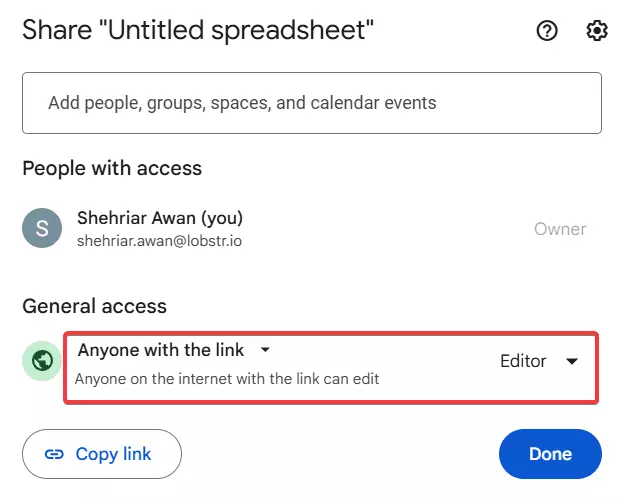
Also, exports are capped at 100,000 rows.
Once this is configured, you don’t need to touch it again. Every completed run updates the sheet automatically.
Receive results by email#
If you want the results delivered as a CSV attachment, use email delivery.
curl --location 'https://api.lobstr.io/v1/delivery?squid=<squid_hash>' \
--header 'Authorization: Token <api_key>' \
--data-raw '{
    "email": "user@example.com",
    "notifications": true
}'
This sends the CSV file to your email every time a run completes.
A fun fact.
With a typical Python scraper, your machine has to stay running. Either your local system stays on, or you set up a VPS just to keep the script alive.
That’s not how this script works.
Once you start a run, everything executes on Lobstr.io’s servers. You can close your terminal, shut down your PC, or walk away entirely.
The run continues in the background.
When it finishes, the results are automatically exported to Google Sheets or sent to your email, depending on how you’ve configured Delivery.
The Python script is just a trigger and controller. The actual scraping doesn’t depend on your machine staying online.
And that’s a wrap. Before saying goodbye, let me answer 2 important questions.
06 / 07FAQs#
What's the best Instagram profile scraper API?#
lobstr.io, in my experience. No proxy add-ons, no login required, 70+ data fields per profile, 100 profiles/month free, and pricing drops to $0.5 per 1,000 profiles at scale. Other APIs either skimp on data, charge extra for proxies, or fall over past a few thousand profiles. I'll publish a full head-to-head comparison soon.
Will using Lobstr.io ban my IP?#
No. The scraping doesn’t happen from your machine. Once you trigger a run, everything executes on Lobstr.io’s infrastructure.
Your local IP never touches Instagram. You’re just calling an API, not scraping Instagram directly from your system.
Can I scrape posts from Instagram profiles with Lobstr.io?#
Yes. Just like profile data, Lobstr.io offers ready-made scraper for Instagram posts, and a dedicated scraper for Reels as well.
👉 Instagram Post Scraper 👉 Instagram Reels Scraper
Do I need an Instagram profile scraper API, or can I just use Instaloader?#
Yes, you can. Instaloader is a CLI tool mainly built for downloading photos from Instagram, and it can scrape profile data too.
I didn’t use it here for 2 reasons. First, it got my IP flagged after a few requests. Second, the profile data points are very limited.
It’s a solid tool for downloading posts and Reels. Not great for scalable profile data collection.
07 / 07Conclusion#
That's a wrap on how to scrape Instagram profiles using an Instagram profile scraper API with Python. Pick an API that handles sessions, proxies, and rate limits for you (like lobstr.io), and you're done in an afternoon instead of a month.
If I missed anything or you want me to cover a related topic, feel free to send me a DM on LinkedIn.